Auto captions
Captions from your script,
not from guesswork
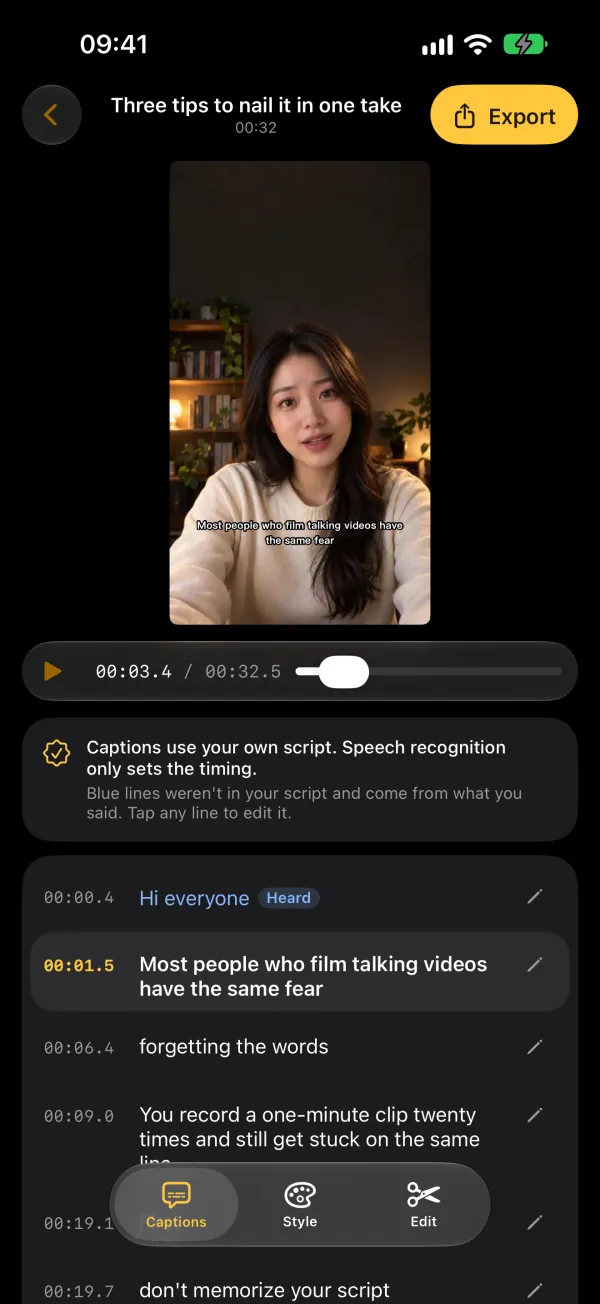
Record with No Retakes and the captions are ready when you stop. The words come from the script you wrote; speech recognition only works out when each line was said. Nothing misheard to fix, and no limit on how many videos you caption.
- Exact words from your script
- Unlimited, no per-minute fees
- 12 styles, 4K or SRT
Updated
How it works
What happens when you stop recording
- RecognizeYour iPhone recognizes the recording to find when each word was said.
- Match to the scriptEach line of your script is lined up with the moment you said it. The text stays exactly as you wrote it.
- Fill in ad-libsAnything you said that isn't in the script is added from what was heard and shown in blue, so you can check it. Tap any line to edit.
- Style and exportPick a style, size and position, then burn the captions into 4K or 1080p video, or export an SRT file.
Captions are made for videos recorded in No Retakes, where the app knows which script you read. They work in all nine languages voice follow supports.
Compared
Versus recognition-only captions
| No Retakes | Typical auto-caption tools | |
|---|---|---|
| Where the words come from | Your script, as written | Speech recognition |
| Names, numbers, jargon | Spelled the way you wrote them | Often misheard and fixed line by line |
| Punctuation | From your script | Guessed, or missing |
| How many videos | Unlimited, never billed by the minute | Often capped by minutes or credits |
| Where it's processed | On your iPhone | Often on a server |
Caption styles
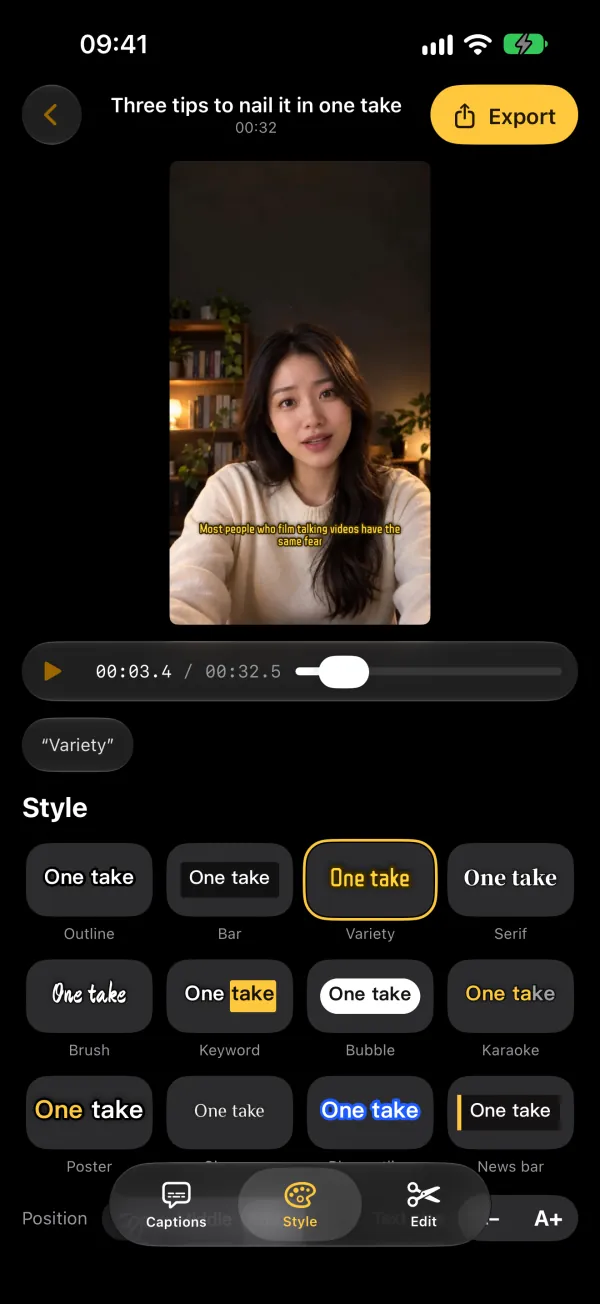
12 styles. What you see is what you export
- Preview and export use the same renderer
- Change the size, and place captions at the top, middle or bottom
- Two styles are free; Lifetime unlocks all 12
- Export video with captions burned in (4K or 1080p, 30 fps), or an SRT file for your video editor (Lifetime)
Edit by text
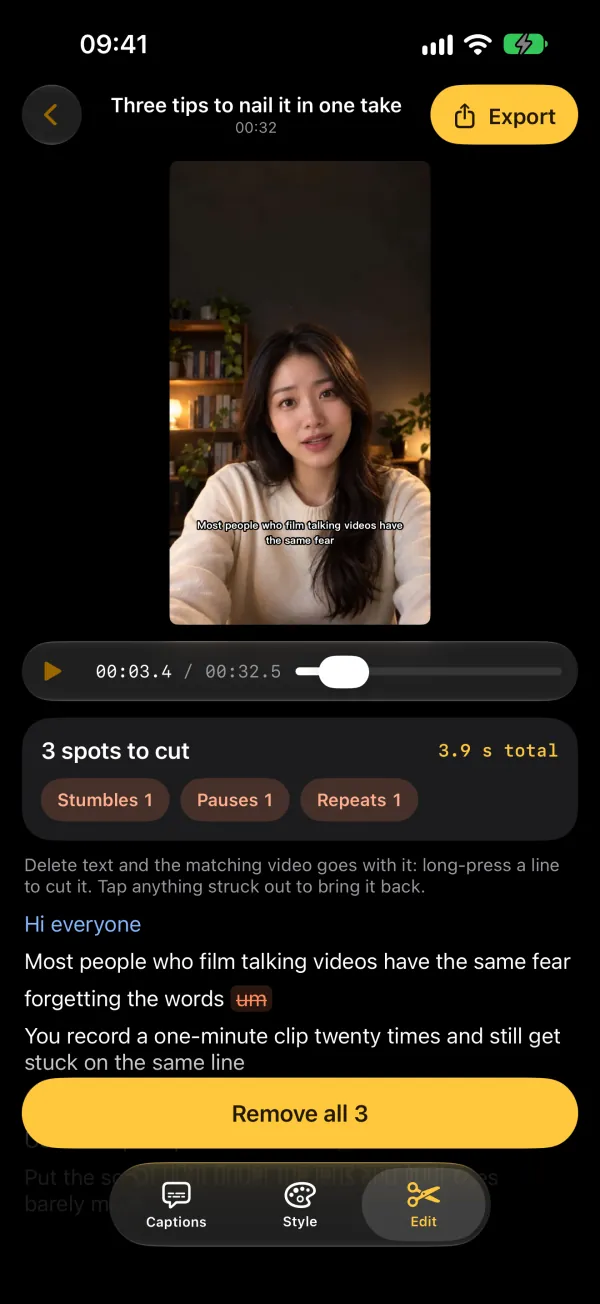
Stumbles, pauses and repeats,
gone in one tap
- Finds fillers like “um” and “uh”, long pauses and lines you said twice
- Delete words and the matching video goes with them
- Captions are cut and re-timed with the video; Undo brings everything back
- Finding them is free; cutting needs Lifetime
FAQ
Common questions
Can I add captions to a video I already filmed?
No. Captions are made for videos you record in No Retakes, because they're matched to the script you read. Videos from Photos can't be imported.
What if I go off script?
Lines you ad-lib are filled in from what you said and shown in blue. They come from speech recognition, so give them a quick check; tap any line to edit it.
Is there a watermark?
Free exports have a small watermark in the bottom-right corner. Lifetime, a one-time purchase ($9.99 in the US), removes it.
Can I use the captions in another editor?
Yes. Export an SRT caption file (Lifetime) and import it into your editor along with the video.

Script under the lens,
captions from your script
Captions are free and unlimited. Lifetime is a one-time purchase ($9.99 in the US), not a subscription.
Search for “Teleprompter · No Retakes” on the App Store, or tap the button below. The free version never expires.
Download on the App Store Questions? Email us